

Coding & Web, lesson 7 of 12
Code for Logging DHT11 Sensor Data on a Realtime Database (Firebase)
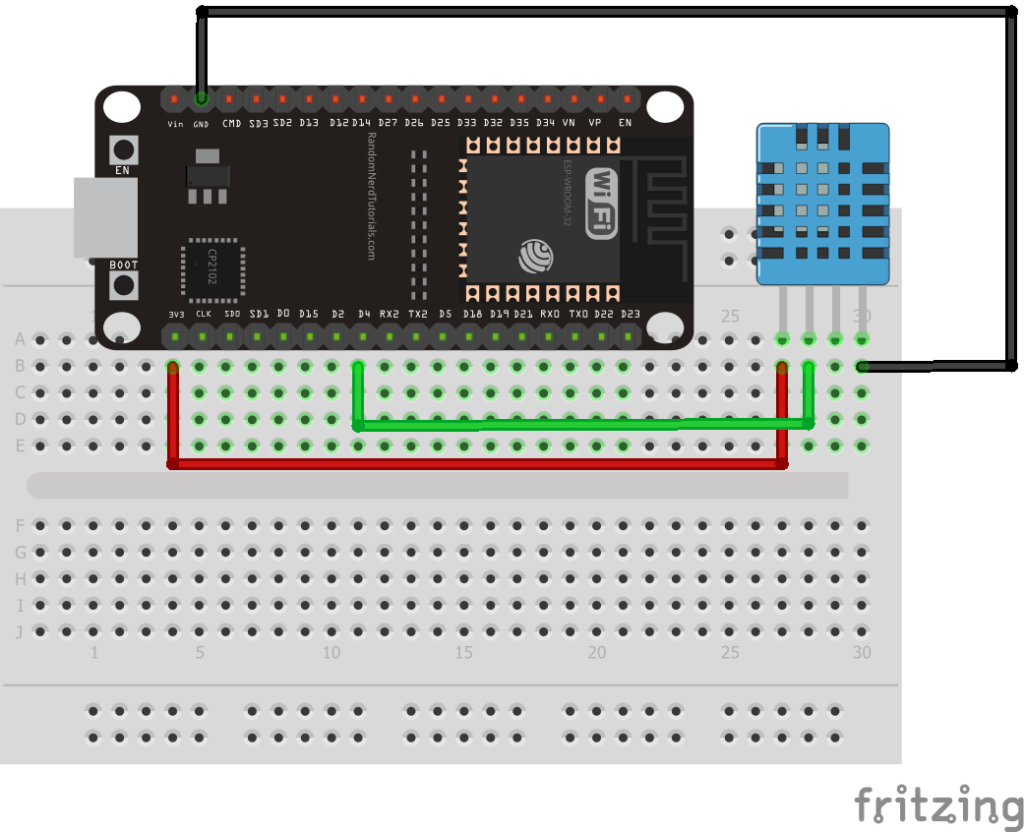
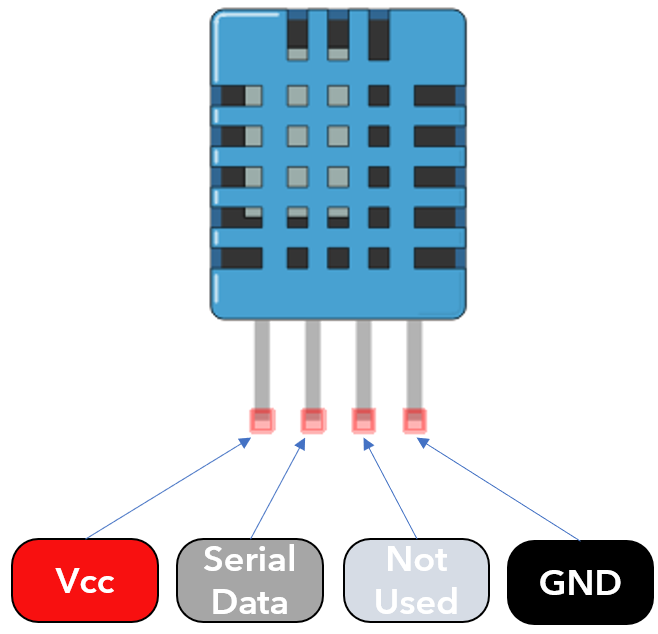
#include <Arduino.h>
#include <WiFi.h>               //we are using the ESP32
//#include <ESP8266WiFi.h>      // uncomment this line if you are using esp8266 and comment the line above
#include <Firebase_ESP_Client.h>
#include <DHT.h>                // Install DHT library by adafruit 1.3.8

#define DHT_SENSOR_PIN 4
#define DHT_SENSOR_TYPE DHT11

//To provide the ESP32 / ESP8266 with the connection and the sensor type
DHT dht_sensor(DHT_SENSOR_PIN, DHT_SENSOR_TYPE);

//Provide the token generation process info.
#include "addons/TokenHelper.h"
//Provide the RTDB payload printing info and other helper functions.
#include "addons/RTDBHelper.h"

// Insert your network credentials
#define WIFI_SSID "YOUR_WIFI_NAME_SSID"
#define WIFI_PASSWORD "YOUR_WIFI_PASSWORD"

// Insert Firebase project API Key
#define API_KEY "ENTER_YOUR_PROJECT_API_KEY_HERE"

// Insert RTDB URLefine the RTDB URL */
#define DATABASE_URL "ENTER_YOUR_DATABASE_URL_HERE"

//Define Firebase Data object
FirebaseData fbdo;

FirebaseAuth auth;
FirebaseConfig config;

unsigned long sendDataPrevMillis = 0;
int count = 0;
bool signupOK = false;                     //since we are doing an anonymous sign in

void setup(){

  dht_sensor.begin();
  Serial.begin(115200);
  WiFi.begin(WIFI_SSID, WIFI_PASSWORD);
  Serial.print("Connecting to Wi-Fi");
  while (WiFi.status() != WL_CONNECTED){
    Serial.print(".");
    delay(300);
  }
  Serial.println();
  Serial.print("Connected with IP: ");
  Serial.println(WiFi.localIP());
  Serial.println();

  /* Assign the api key (required) */
  config.api_key = API_KEY;

  /* Assign the RTDB URL (required) */
  config.database_url = DATABASE_URL;

  /* Sign up */
  if (Firebase.signUp(&config, &auth, "", "")){
    Serial.println("ok");
    signupOK = true;
  }
  else{
    Serial.printf("%s\n", config.signer.signupError.message.c_str());
  }

  /* Assign the callback function for the long running token generation task */
  config.token_status_callback = tokenStatusCallback; //see addons/TokenHelper.h

  Firebase.begin(&config, &auth);
  Firebase.reconnectWiFi(true);
}

void loop(){

  //temperature and humidity measured should be stored in variables so the user
  //can use it later in the database

  float temperature = dht_sensor.readTemperature();
  float humidity = dht_sensor.readHumidity();

  if (Firebase.ready() && signupOK && (millis() - sendDataPrevMillis > 1000 || sendDataPrevMillis == 0)){
    //since we want the data to be updated every second
    sendDataPrevMillis = millis();
    // Enter Temperature in to the DHT_11 Table
    if (Firebase.RTDB.setInt(&fbdo, "DHT_11/Temperature", temperature)){
      // This command will be executed even if you dont serial print but we will make sure its working
      Serial.print("Temperature : ");
      Serial.println(temperature);
    }
    else {
      Serial.println("Failed to Read from the Sensor");
      Serial.println("REASON: " + fbdo.errorReason());
    }


    // Enter Humidity in to the DHT_11 Table
    if (Firebase.RTDB.setFloat(&fbdo, "DHT_11/Humidity", humidity)){
      Serial.print("Humidity : ");
      Serial.print(humidity);
    }
    else {
      Serial.println("Failed to Read from the Sensor");
      Serial.println("REASON: " + fbdo.errorReason());
    }
  }
}