

Projects Hub, lesson 26 of 34
Creating a Temperature-Controlled Fan System with Arduino Uno and LM35 Sensor
Introduction
In this guide, we delve into the intricacies of designing a Temperature-Based Fan Speed Control & Monitoring system using Arduino and the LM35 Temperature Sensor. This project enables dynamic control of an electric fan's speed based on temperature variations, offering enhanced user convenience through an LCD interface. Here, we'll explore the components, circuitry, working principles, and even provide the necessary code for implementation.
Temperature-based fan control systems find applications in a multitude of settings, including air-conditioners, ovens, and thermal baths, among others. Our project leverages the precision of the LM35 Temperature Sensor and the versatility of Arduino to create an efficient and responsive fan speed control mechanism.
Working
The LM35 Temperature Sensor converts temperature into an analog signal, which is then processed by the Arduino. The Arduino, equipped with an ATmega328 microcontroller, converts this analog signal into digital data. Subsequently, the system dynamically adjusts the fan speed based on temperature variations, with the LCD displaying both the temperature in Celsius and the fan speed as a percentage. When the temperature surpasses a predefined threshold (30°C in our case), the fan initiates operation.
To make an actual working system with an commercial fan click here
Things We Need
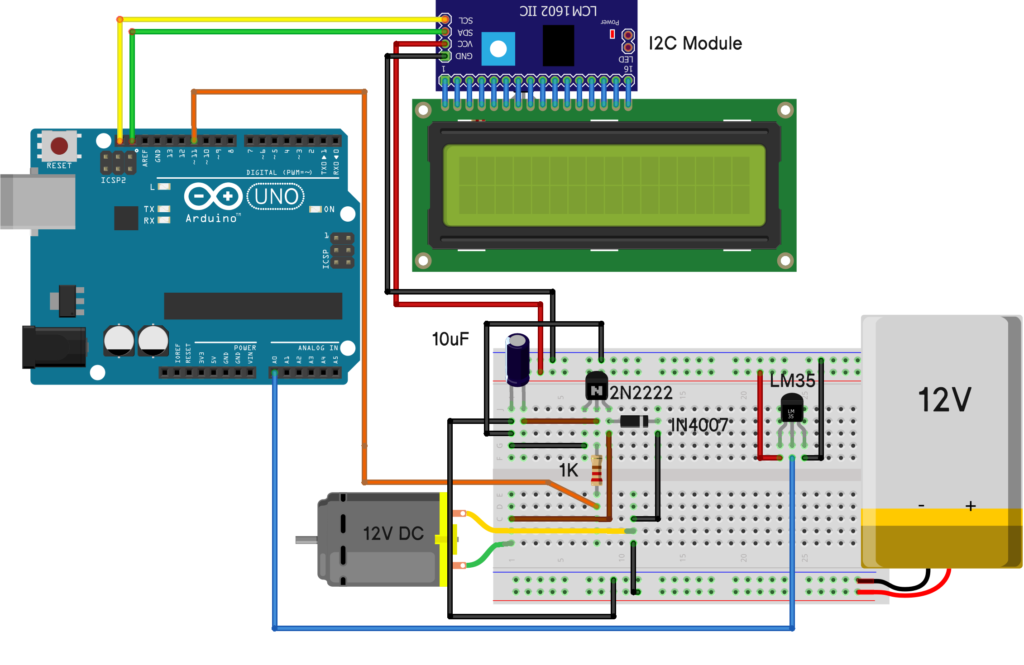
To build this system, gather the following components:
- Arduino Uno
- LM35 Temperature Sensor
- 12V DC Fan
- 16x2 LCD Display with I2C Module (Click here how interface the LCD with i2c)
- Potentiometer 10K
- Transistor 2N2222
- Resistor (1k ohm)
- Diode 1N4007
- Capacitor 10uF
- LED 5mm (red for indication)
- 12V Power Supply/Adapter
- Connecting Wires
- Breadboard
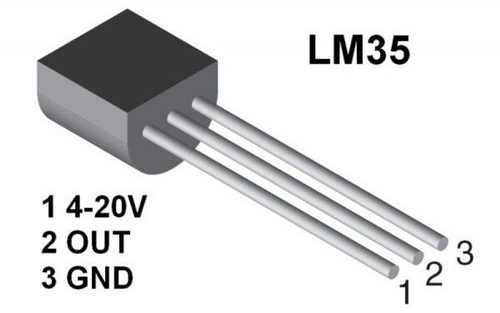
LM35 Sensor
The LM35 temperature sensor provides an output voltage directly proportional to the Celsius temperature it measures. With a sensitivity of 10 mV/°C, it eliminates the need for external calibration circuitry. As temperature rises, the output voltage increases linearly. Leveraging this characteristic, our system will monitor temperature changes and adjust the fan speed accordingly to maintain a desired temperature range.
Circuit Diagram
#include <Wire.h>
#include <LiquidCrystal_I2C.h>

LiquidCrystal_I2C lcd(0x27, 16, 2); // Set the LCD address to 0x27 for a 16 chars and 2 line display

int tempPin = A0; // the output pin of LM35
int fan = 11; // the pin where fan is
int led = 8; // led pin
int temp;
int tempMin = 30; // the temperature to start the fan 0%
int tempMax = 60; // the maximum temperature when fan is at 100%
int fanSpeed;
int fanLCD;

void setup() {
  pinMode(fan, OUTPUT);
  pinMode(led, OUTPUT);
  pinMode(tempPin, INPUT);
  lcd.init();                      // initialize the lcd
  lcd.backlight();                 // Turn on backlight
  Serial.begin(9600);
}

void loop() {
  temp = readTemp(); // get the temperature
  Serial.print(temp);

  if (temp < tempMin) { // if temp is lower than minimum temp
    fanSpeed = 0; // fan is not spinning
    analogWrite(fan, fanSpeed);
    fanLCD = 0;
    digitalWrite(fan, LOW);
  }

  if ((temp >= tempMin) && (temp <= tempMax)) { // if temperature is higher than minimum temp
    fanSpeed = temp; //map(temp, tempMin, tempMax, 0, 100); // the actual speed of fan//map(temp, tempMin, tempMax, 32, 255);
    fanSpeed = 1.5 * fanSpeed;
    fanLCD = map(temp, tempMin, tempMax, 0, 100); // speed of fan to display on LCD100
    analogWrite(fan, fanSpeed); // spin the fan at the fanSpeed speed
  }

  if (temp > tempMax) { // if temp is higher than tempMax
    digitalWrite(led, HIGH); // turn on led
  } else { // else turn of led
    digitalWrite(led, LOW);
  }

  lcd.clear();
  lcd.setCursor(0, 0);
  lcd.print("TEMP: ");
  lcd.print(temp); // display the temperature
  lcd.print("C ");
  lcd.setCursor(0, 1); // move cursor to next line
  lcd.print("FANS: ");
  lcd.print(fanLCD); // display the fan speed
  lcd.print("%");
  delay(200);
}

int readTemp() { // get the temperature and convert it to celsius
  temp = analogRead(tempPin);
  return temp * 0.48828125;
}
Conclusion
Temperature-Based Fan Speed Control & Monitoring with Arduino presents a versatile and practical solution for various temperature-sensitive applications. By integrating the LM35 Temperature Sensor with Arduino, users can achieve precise fan speed modulation, ensuring optimal temperature regulation in diverse environments.