

Projects Hub, lesson 27 of 34
Water Level Monitoring and Pump Control System with Arduino
In this comprehensive guide, we'll explore the intricacies of designing a Water Level Monitoring and Pump Control System using Arduino, relay, AC motor, float switch sensor, and other essential components. This project empowers users to monitor the water level in a tank and control a pump accordingly, ensuring efficient water management. With the integration of a display, users can easily visualize the current water level, enhancing system usability.
Introduction
Water level monitoring and pump control systems play a crucial role in various applications, including water tanks, reservoirs, and irrigation systems. Our project leverages the versatility of Arduino and the precision of a float switch sensor to create a reliable and user-friendly solution. By combining hardware components and programming, users can automate the pump operation based on real-time water level data.
Working Principle
The float switch sensor detects the water level in the tank, generating corresponding signals based on the water level. These signals are interpreted by the Arduino, which then activates or deactivates the relay based on predefined water level thresholds. When the water level falls below a certain threshold, the Arduino triggers the relay to activate the pump, replenishing the water. Conversely, when the water level rises above a specified threshold, the pump is deactivated to prevent overflow.
Components Required
- Arduino UNO Board
- Float Switch Sensor
- Relay Module
- AC Motor (Pump)
- 16x2 LCD Display with I2C Module
- 12V Power Supply/Adapter
- Connecting Wires
- Breadboard
Circuit Diagram
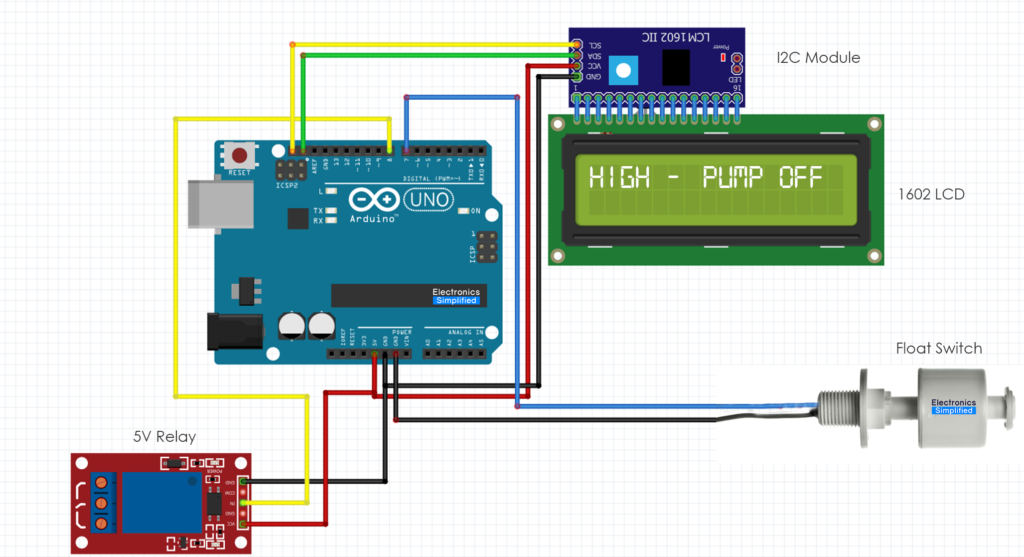
The circuit diagram illustrates the integration of Arduino, float switch sensor, relay module, AC motor (pump), and LCD display. The float switch sensor detects the water level in the tank, while the relay module serves as the interface between Arduino and the AC motor. The Arduino processes sensor data, which is digital. The float switch will set the condition to controls the relay, If the water level is low, the float sensor will be set to LOW. But the relay will be set to HIGH, so that the water is being still pumped into the tank. The entire process is also visualized on the LCD display.
Code
This code assumes that you've already installed the LiquidCrystal_I2C library in your Arduino IDE. The I2C address of the LCD module is assumed to be 0x27; make sure to adjust this value if your module has a different address. This code operates in a similar manner to the previous version but uses the LiquidCrystal_I2C library to communicate with the LCD via I2C protocol.
#include <Wire.h>
#include <LiquidCrystal_I2C.h>

LiquidCrystal_I2C lcd(0x27, 16, 2); // Initialize the LCD with the I2C address and dimensions

const int floatSwitchPin = 7; // Define the pin connected to the digital float switch sensor
const int relayPin = 8; // Define the pin connected to the relay module

void setup() {
  pinMode(floatSwitchPin, INPUT); // Set the float switch pin as input
  pinMode(relayPin, OUTPUT); // Set the relay pin as output

  lcd.init(); // Initialize the LCD
  lcd.backlight(); // Turn on backlight
  lcd.begin(16, 2); // Set up the LCD's number of columns and rows
  lcd.print("Water Level:"); // Display initial message on LCD
}

void loop() {
  int waterLevel = digitalRead(floatSwitchPin); // Read the digital value from the float switch sensor

  if (waterLevel == LOW) { // Check if water level is low (assuming LOW indicates low water level)
    digitalWrite(relayPin, HIGH); // Activate the relay to turn on the pump
    lcd.setCursor(0, 1); // Set cursor position to second row of LCD
    lcd.print("Low - Pump On "); // Display pump status on LCD
  } else {
    digitalWrite(relayPin, LOW); // Deactivate the relay to turn off the pump
    lcd.setCursor(0, 1); // Set cursor position to second row of LCD
    lcd.print("High - Pump Off"); // Display pump status on LCD
  }

  delay(1000); // Delay for stability
}
Conclusion
Water Level Monitoring and Pump Control System with Arduino offers a versatile and practical solution for efficient water management. By integrating the float switch sensor with Arduino, users can automate pump operation based on real-time water level data, ensuring optimal utilization of resources and preventing wastage.